 United
 Available now
IDMinder™ for the Icom IC-7300MK2
Stop watching the clock. IDMinder can play your recorded ID when it is due.
$19.99, one-time purchase, one PC.
14-day money-back promise. See the Refund Policy.
- Saves time: no 10-minute clock-watching while you operate.
- Automatic ID: plays the call sign already recorded in the radio.
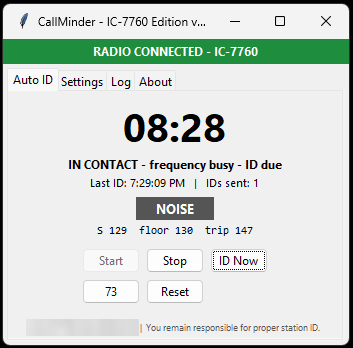
- Tracking: countdown and connection status stay in view.
- Busy-frequency filter: waits for a clear gap; you stay in charge.
You remain responsible for FCC station identification.
Requirements
- Icom IC-7300MK2This edition works with the IC-7300MK2 only (CI-V address B6h, the factory default).
- Windows 10 or 11
- USB connectionBetween the PC and the radio.
- Your ID recorded in the radio's Voice TX Memory T1, and a closing ID in T2For example, "This is KB5XYZ."
See your ID status
A countdown to your next ID and the radio connection status stay in view while you operate.
Use your radio's recordings
Your ID plays from a recording stored in the radio, not from the PC.
Keep ID controls close
ID Now, 73, and Reset together in one window.
You remain responsible for identifying your station and operating it correctly. Monitor the radio and ID timing, and identify manually whenever needed.
See it in action
How it works
IDMinder connects to the radio's USB port and tells the radio when to play a short voice recording of your ID, like "This is KB5XYZ." The audio stays in the radio, so there's no audio wiring and no sound levels to adjust.
How IDMinder decides when to ID
This flowchart shows the yes/no checks IDMinder uses to decide when to play your station ID. The IC-7300MK2 edition uses the October 23, 2026 rule set: no ID sooner than 8 minutes after the last one, the ID plays at the first break from 8 to 10 minutes, and at 9:45 at the latest. The README included with the download lists the full rules.


Features
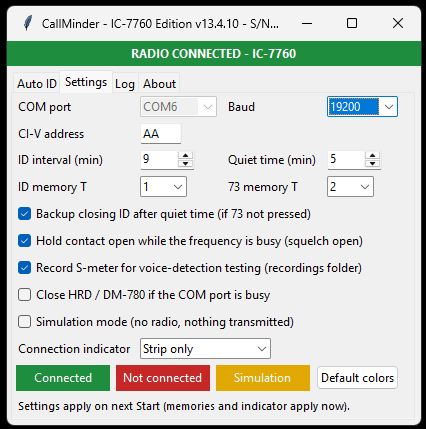
- A countdown to your next ID while you operate, with the option to have the radio play your recorded ID when it comes due.
- An early ID option for slow group nets, before a long wait.
- Waits while the frequency is busy. It can't hear everything, so keep listening yourself.
- An "ID DUE, unkey now" warning with a beep if an ID comes due while you're transmitting.
- A connection indicator: green for connected, red for not answering.
- Reconnect attempts if the USB link drops, and a daily log you can review.
- Buttons for ID Now, a 73 sign-off, and Reset.
- Simulation mode, so you can try everything with nothing transmitted.
Troubleshooting: no COM port when you plug in the radio
If plugging the radio’s USB cable into the computer doesn’t create a COM port, the USB driver is most likely missing or failed.
- Open Device Manager and find the failed device (often under Other devices or Ports with a yellow warning, for example “CP2102 USB to UART Bridge Controller”). Right-click it, choose Uninstall device, and tick delete the driver if offered.
- Unplug the radio’s USB cable.
- Download and install the Silicon Labs CP210x Universal Windows Driver from Silicon Labs’ official download page (unzip it, then right-click silabser.inf > Install, or run the installer).
- Plug the USB cable back in.
- Check that Silicon Labs CP210x USB to UART Bridge (COMx) appears under Ports (COM & LPT), then pick that COM port in IDMinder.
Your responsibility
IDMinder is a helper, not a replacement for the control operator. You remain responsible for identifying your station and operating it correctly. Monitor the radio and ID timing, and identify manually whenever needed.
Is IDMinder right for my station? IDMinder FAQ All UnitedTechs software Free station ID timer
One edition per radio model
Each IDMinder edition is licensed for one radio model, so the IC-7300MK2 edition is a separate product.
Licensing: online. See What you are buying.
IDMinder news and updates
IDMinder for the Icom IC-7300 and IC-7300MK2 is now available for $19.99, alongside the IC-7760 edition.
Availability
IDMinder for the Icom IC-7300MK2: $19.99, one-time purchase, one PC. After checkout you get your license file and the Windows installer right away.
The IDMinder License Agreement for the IC-7300MK2 is shown for reference. 14-day refund policy.
See the IDMinder License Agreement, our Terms, Refund Policy and Privacy Policy. IDMinder has its own IDMinder Privacy Policy.